进度检查器
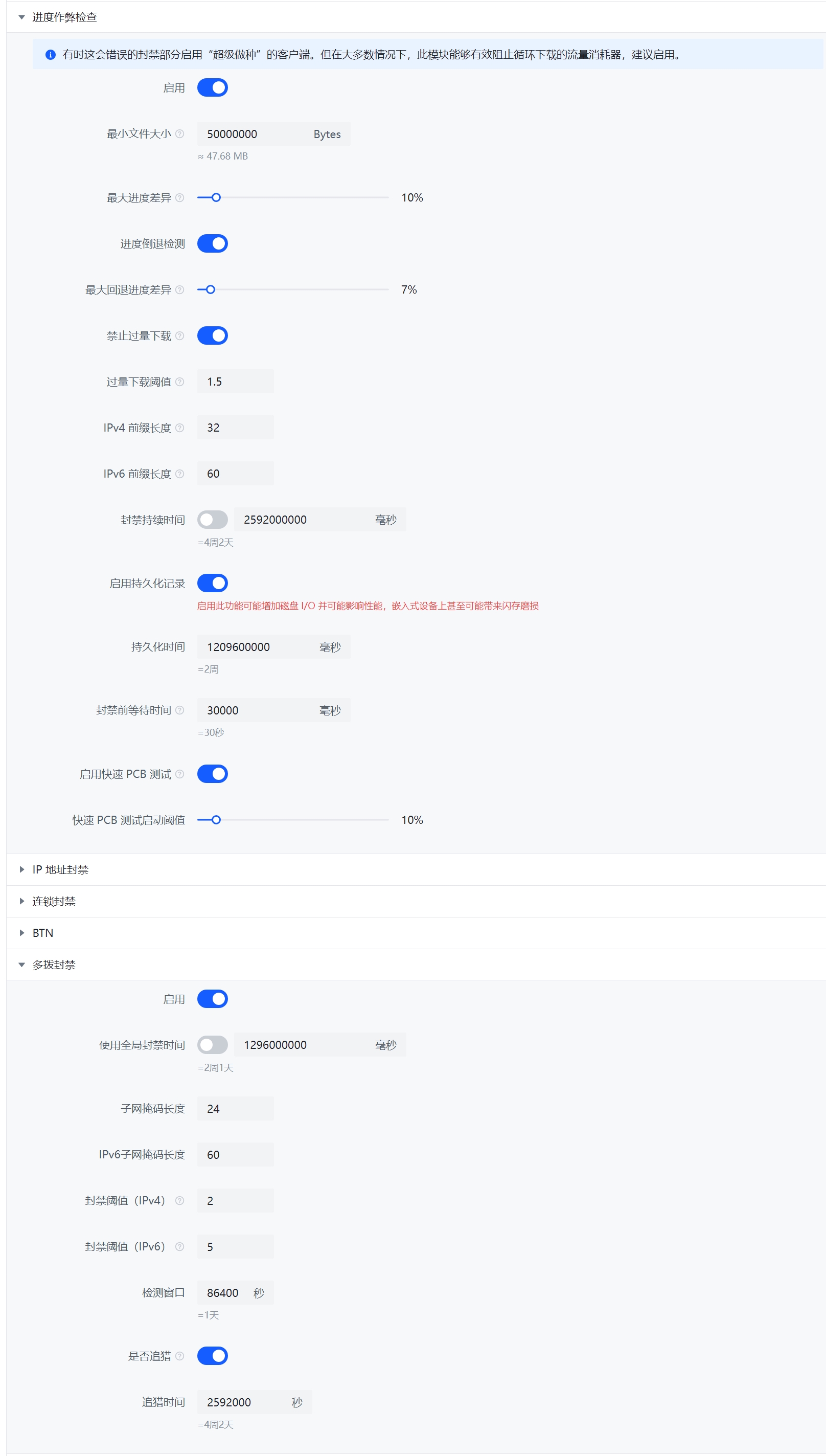
进度检查器(ProgressCheatBlocker)(有时也称为 PCB 或者启发式检测算法)是由 PeerBanHelper 创建的基于下载进度的一种启发式的反吸血检测算法。
概述
传统的反吸血通常依靠检查 PeerID 或者 ClientName 来屏蔽。这对于迅雷或者QQ旋风这种如实报告自己 PeerID 的 Peer 效果不错。但如果恶意吸血者冒充了 qBittorrent 或 Transmission 这种正常客户端,那么传统的反吸血手段就会完全失效。
PeerBanHelper 会持续追踪所有活动种子上的活跃 Peers,实时追踪它们的进度情况。在出现下面的情况时,PeerBanHelper 就会封禁它们:
- Peer 不汇报自己的进度,一直保持为 0%
- Peer 不如实汇报自己的进度,汇报的进度与实际下载了的进度不符
- Peer 断开重连后进度归零,或者进度变少超过一定值(进度回退)
- Peer 在下载了 100% 种子体积大小后,没有断开连接而是仍然持续下载(超量下载)
对于进度检查器来说,其进度判定不是基于单个 IP 地址,而是基于 “IP 组”。同一个组里的 IP 地址都被视为同一个 Peer,不论 IP、端口、PeerID、ClientName 是否相同。
- 对于 IPv4,这个组的默认大小是
/32,也就是 1 个 IPv4 地址 - 对于 IPv6,这个组的默认大小是
/60,通常是路由器得到的 IPv6 前缀大小
PBH 持续追踪 Peer 的下载进度,并计算其上传量和上传增量。当 Peer 的统计数据由于某种原因重置了(例如更换端口和PeerID),PBH 会通过之前记录的数据为 Peer 修正进度以避免进度欺骗。
进度差异
PeerBanHelper 会根据下载器数据、本地记录数据和 Peer 汇报数据,综合计算 Peer 当前最少进度。如果 Peer 的进度比最少进度还要少(虚报进度),则 PeerBanHelper 将会封禁 Peer。
过量下载
恶意 Peer 的目的是尽可能多的从受害者处下载数据,因此 PeerBanHelper 会根据下载器数据、本地记录数据和 Peer 汇报数据,综合计算 Peer 已经下载的量。
该计算的下载量不完全依赖下载器,因为攻击者可以轻松欺骗和重置下载器的统计信息。
如果 Peer 下载的数据量超过整个当前用户拥有的数据总大小一定比例(也就是下载了比拥有的种子的总体积还要多的数据),PeerBanHelper 将对其执行封禁操作。
持久化记录
关闭状态下,数据全部保存在内存中。当内存不足或者一段时间没有使用后,数据将会被清空删除。此时 PeerBanHelper 会 “忘记” 之前记录的数据。
启用持久化记录后,在从内存删除前,数据将被保存到数据库中,并在未来需要(且数据未过期时)重新读取载入。可以有效避免攻击者打游击战,避免攻击者进行缓存遗忘攻击。
快速 PCB 测试
一种快速检测算法,当 Peer 的下载进度(计算的)达到 “快速 PCB 测试启动阈值” 后,PeerBanHelper 会短暂封禁对方(默认是 30 秒)以便断开连接,并在稍后解除封禁。一部分恶意客户端在断开连接后,其汇报进度将归零,PCB 反作弊将能够立刻捕捉这种异常情况,加快异常、恶意客户端的封禁速度。减少流量损失。
配置文件
  # 进度作弊检查器:Progress Cheat Blocker
  # 注:有时这会错误的封禁部分启用“超级做种”的客户端。但在大多数情况下,此模块能够有效阻止循环下载的流量消耗器,建议启用。
  # Note: Sometimes it may incorrect ban some clients if they enabled "Super Seeding", but in most cases, it can accurately detect the cheat/bad peers.
  progress-cheat-blocker:
    enabled: true
    # Torrent 小于此值不进行检查(单位:字节),对等体可能来不及同步正确的下载进度
    # Skip the check if torrent smaller than this value, unit: bytes, peer may have to no chance to sync the progress
    minimum-size: 50000000
    # 最大差值,单位百分比(1.0 = 100% 0.5=50%); Max difference, float percentage (1.0=100%, 0.5=50%)
    # PeerBanHelper 根据 BT 客户端记录的向此对等体实际上传的字节数,计算该对等体的最小下载进度
    # PeerBanHelper will use BT client recorded data to check the actual uploaded bytes, and calculate minimal progress that this peer should have
    # 并与对等体汇报给 BT 客户端下载进度进行比较
    # and compare with peer reported progress
    # 如果对等体汇报的总体下载进度远远低于我们上传给此对等体的数据量的比例,我们应考虑客户端正在汇报假进度
    # If peer reported progress is smaller than our calculated progress too much, we will consider it's cheating
    # 默认值为:10%
    # Default allowed percentage is 10%
    # 即:假设我们上传了 50% 的数据量给对方,对方汇报自己的下载进度只有 39%,差值大于 10%,进行封禁
    # It will run like: if we uploaded 50% of data at least to peer, but peer reporting it only have 39%, difference ge 10%, we will ban it
    # 对于自动识别迅雷、QQ旋风的变种非常有效,能够在不更新规则的情况下自动封禁报假进度的吸血客户端
    # It works well on detecting new various and cheat clients.
    maximum-difference: 0.1
    # 进度倒退检测 - Progress rewind detection
    # 默认:最多允许倒退 7% 的进度 - Default: Up to 7% rewind is allowed
    # (考虑到有时文件片段在传输时可能因损坏而未通过校验被丢弃,我们允许客户端出现合理的进度倒退)
    # (Sometimes the pisces may break during transfer, client may drop those pisces, we allow client have rewind in reasonable range)
    # 设置为 -1 以禁用此检测
    # Set to -1 for disabling
    rewind-maximum-difference: 0.07
    # 过量下载:禁止那些在同一个种子的累计下载量超过种子本身大小的客户端
    # Excessive download - Block peers that download even more bytes on a single torrent than the torrent itself
    # 此模块对 Transmission 不起效
    # Not working with Transmission
    block-excessive-clients: true
    # 过量下载计算阈值
    # Calculation threshold
    # 计算方式是: 是否过量下载 = 上传总大小 > (种子总大小 * excessive_threshold)
    # IsExcessive = uploaded > (torrent_size * excessive_threshold)
    excessive-threshold: 1.5
    # IPV4 前缀长度,前缀相同的 IP 都被视为同一个用户
    # IPV4 prefix length, same prefix will trick as a same user
    # 32 = 单个 IP 地址,IPV4 资源宝贵,通常 ISP 不会分配多个 IP 地址
    # 32 = Single IP address, ISP usually only allocate single IPV4 for one user
    ipv4-prefix-length: 32
    # IPV6 前缀长度,前缀相同的 IP 都被视为同一个用户
    # IPV6 prefix length, same prefix will trick as a same user
    # 64 = 常见的 ISP 为单个接入用户分配的前缀长度
    # 64 = The common prefix length that ISP allocate for one user
    ipv6-prefix-length: 60
    ban-duration: 2592000000
    # 启用持久化记录
    # Enable persist recording
    # 启用此功能可能增加磁盘 I/O 并可能影响性能
    # May increase disk I/O and impact the performance
    enable-persist: true
    # 持久化数据存储时长
    # Persist duration
    # 延长此值可缓解针对 PeerBanHelper 的 “缓慢失忆攻击”,但会增加磁盘 I/O 并影响性能
    # Increase this value can alleviate "Slow forgetting attack", This helps stop bad peers from taking advantage of this weakness to reset their data records.
    # 缩短此值可提高性能但吸血者者可能利用这一点进行 “缓慢失忆攻击”
    # Decrease this value may lead to "Slow forgetting attack"
    # 单位:ms 默认值:1209600000 (14 天)
    # Time unit: ms, default: 1209600000 (14 days)
    persist-duration: 1209600000
    # 封禁前最长等待时间
    # Max duration before ban
    # 有时由于下载器网络原因,Peer 可能无法及时同步其进度信息
    # Sometimes due the network issue, the peer may cannot sync the progress information on time
    # 当 Peer 达到封禁阈值后开始计时,如果 Peer 未在给定时间内更新自己的进度到正常水平,则将被封禁
    # When a Peer reached ban condition, the timer will start and Peer will be banned after timer timed out if Peer's progress not update to excepted value on time
    # 注意:这不适用于进度回退和过量下载
    # Note: This not suitable for progress rewind or over-download
    max-wait-duration: 30000
    # 快速 PCB 测试启动阈值
    # Fast PCB testing start threshold
    # 此选项将允许 PCB 在 Peer 下载指定量的数据后,将其短暂的封禁一段时间以便断开其连接
    # This option will allow PCB ban the Peer from downloader for disconnect it
    # 这有助于快速预热进度重置检查
    # Can heat up progress reset check quickly
    # 设置为 -1 以禁用
    # Set to -1 for disable it
    # 百分比为浮点百分比,0.5=50%; 1.0 = 100%
    # Percentage in float, 0.5=50%; 1.0 = 100%
    fast-pcb-test-percentage: 0.1
    # 快速 PCB 测试断开连接持续时间
    # The disconnect duration for fast PCB test
    # 更长的时间更容易使得恶意吸血者的临时记录从 LRU 缓存中逐出,以便 PBH 识别它;但也会影响正常下载者的速度和体验
    # The longer time can lead cheaters temp records be invalid and remove from LRU cache, then PBH can detect it; but it can also affect the normal peers speed and experience
    # 时间单位(Time Unit): 毫秒(ms)
    fast-pcb-test-block-duration: 15000
缺陷
- 如果对方使用 “超级做种”,那么这可能会导致意外封禁。
- 如果没有关闭下载器的 “允许来自同一 IP 地址的多个连接”,则可能导致统计数据出错,成倍增加快速增长。这个选项对于 qBittorrent 来说默认是关闭的。